

Personal Online & Mobile Banking Enrollment


Access and manage your accounts 24/7.

Conveniently manage and access your Drake Bank accounts with online and mobile banking. Features include:

  • View accounts, balances, and transaction history
  • Transfer funds, schedule recurring transfers, make loan payments, and pay bills
  • Send money to trusted contacts with Zelle®
  • Deposit checks with your mobile device
  • Set up email and text alerts based on account activity and balances
Get Setup


Online Banking

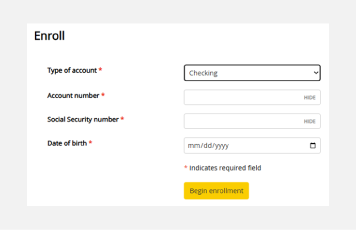
  1. Click here to start the enrollment process
  2. Fill out the enrollment form
  3. Create login credentials
  4. Set up security questions
  5. Choose paper or e-statements

Mobile Banking

To access Mobile Banking, you need to complete the Online Banking enrollment first.

  1. Open the Google Play or App Store, respectively
  2. Search for ‘Drake Bank’
  3. Download the ‘Drake Bank Mobile Banking’ app
  4. Enter your Online Banking credentials and answer your security question
  5. Accept the terms & conditions

Product Support

Have questions? Contact our product support team today—we’re here to help.

Send Email
(651) 461-8760

Personal Online Banking

Access personal online banking and learn about other online banking features.

LEARN MORE

Account Alerts

Set up custom alerts to stay on top of your account activity.

LEARN MORE

Additional Resources


Forms & Applications

Quick access to forms and applications to get you started.

LEARN MORE

Resource Center

Explore helpful tools, support, and financial resources.

LEARN MORE

Security Center

Tips and products on how to keep your accounts secure and protect them from fraud.

LEARN MORE

Google Play and the Google Play logo are trademarks of Google LLC.
App Store and the App Store logo are registered trademarks of Apple Inc.

Build A Better Future.

We’re here to make your relationship with money simpler and more meaningful, helping you reach the future you’re aiming for.

ABOUT DRAKE BANK