Account Alerts


Stay on top of your finances with mobile alerts.

Custom alerts allow you to enjoy peace of mind wherever you go. You can:
  • Monitor account balances and activity
  • Get deposit and withdrawal notifications
  • Control security alerts

How It Works


Getting Started

  1. Log in to Online Banking using your User ID and password.
  2. Select ‘Alerts’ in the top menu bar.
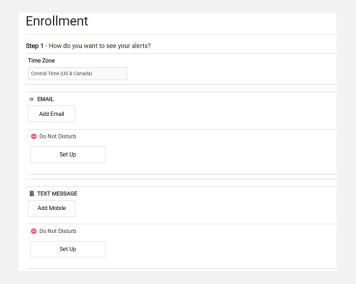
  3. Complete the form to determine how you want to receive alerts.
  4. Activate the contact methods by verifying one-time codes.
  5. Optional: Set up ‘Do Not Disturb’ time periods
  6. Click ‘Next’.
  7. To continue, select the ‘Enable Alerts’ section of this guide, and start at step #3.

Enable Alerts

  1. In Online Banking, select ‘Alerts’ in the top menu bar.
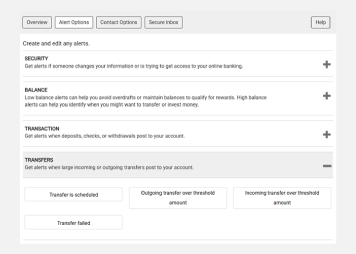
  2. Select ‘Alert Options’ in the Alerts menu.
  3. Review the alert types and select the ones you want to receive alerts for.
  4. Complete the alert requirements, including how you want to be notified.
  5. Once complete, click ‘Save’.
  6. Repeat these steps for all alerts you want to turn on.

Manage Alerts

  1. In Online Banking, select ‘Alerts’ in the top menu bar.
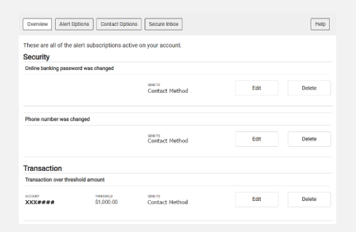
  2. The ‘Overview’ screen shows any active alerts for your accounts.
  3. Select ‘Edit’ or ‘Delete’ to manage the alert or change notification methods.

Update Contact Methods

  1. In Online Banking, select ‘Alerts’ in the top menu bar.
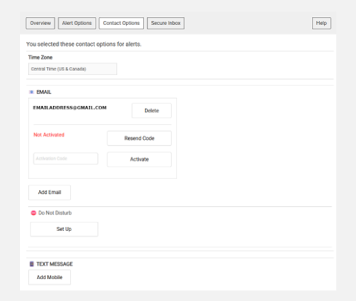
  2. Select ‘Contact Options’ in the Alerts menu.
  3. On this screen, you can add, delete, and activate contact methods for alerts.
  4. Once contact methods are updated, you will need to modify these methods in any active alerts. See the ‘Manage Alerts’ section of this guide for more information.

Frequently Asked Questions

Account Alerts are real-time notifications that help you stay informed about your account activity. It sends customized notifications via email, text, or mobile app push notifications.

Account Alerts are free for Drake Bank clients. However, message and data rates may apply depending on your mobile carrier.

Yes, you can manage or turn off alerts anytime through online banking settings. See the ‘Manage Alerts’ steps above for more information.

Yes, Account Alerts are built with security in mind. It helps detect unusual activity and adds an extra layer of protection by keeping you informed in real-time.

Product Support

Have questions? Contact our product support team today—we’re here to help.

Send Email
(651) 461-8760

Personal Online Banking

Access personal online banking and learn about other online banking features.

LEARN MORE

Business Online Banking

Access business online banking and learn about other online banking features.

LEARN MORE

Additional Resources


Forms & Applications

Quick access to forms and applications to get you started.

LEARN MORE

Resource Center

Explore helpful tools, support, and financial resources.

LEARN MORE

Security Center

Tips and products on how to keep your accounts secure and protect them from fraud.

LEARN MORE

Build A Better Future.

We’re here to make your relationship with money simpler and more meaningful, helping you reach the future you’re aiming for.

ABOUT DRAKE BANK