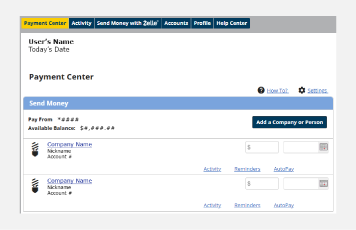
Bill Pay


Conveniently manage and pay your bills from one place.

Use online or mobile banking to receive, manage, and pay your bills without writing checks, buying stamps, or making a trip to the post office. Features include:

  • Adding companies or people for bill payments
  • Setting up reminders and autopay
  • Scheduling bill payments
  • Viewing activity and history

How It Works


Via Online Banking

Personal Online Banking
  1. Log in to your Drake Bank Online Banking account
  2. Go to ‘Bill Payment’
  3. Select ‘Add Company or Person’
  4. Follow the prompts to add a biller
  5. Return to ‘Payment Center’ to schedule a payment

Business Online Banking
  1. Log in to your Drake Bank Business Online Banking account
  2. Select ‘Payments & Transfers’ and then’Bill Pay’
  3. Select ‘Add a Bill’
  4. Follow the prompts to add a bill
  5. Return to ‘Payment Center’ to schedule a payment

Via Mobile Banking

  1. Log in to your Drake Bank Mobile Banking app
  2. Select the ‘Transfer & Pay’ tab and then ‘Pay Bills’
  3. Select ‘Add New’
  4. Follow the prompts to add a biller
  5. Return to ‘Pay Bills’ to schedule a payment.

Frequently Asked Questions

You can pay anyone in the U.S. you usually pay via check, automatic debit, or cash. You can pay companies, people, and service providers.

When you use Bill Pay, we will send the payment electronically whenever possible; if the company or person cannot receive electronic payments, we will print and send a check to the address you provided.

You can also pay trusted individuals using only an email address or mobile phone number using Zelle®.

You can see the status of your payments in the ‘Activity’ section. Payments start in pending status until processing begins.

You can change the amount, due date, or cancel the payment until it is processed.

Via Online Banking, go to your ‘Pending Payments’ and select either ‘Change’ or ‘Cancel.’

Via Mobile Banking, go to your ‘Activity’ and select either ‘Cancel Payment’ or ‘Edit.’

Yes, for billers that are not set up for eBills or autopay, you can set reminders so you don’t miss a payment.

Via Online Banking, go to ‘Bill Payment.’ Then, under a current biller, select ‘Reminders’ and then ‘Set Up Reminders.’ Follow the prompts and determine how you would like to be notified. Then select ‘Send Reminders’ to establish the reminder notifications.

You can contact our team for support or select ‘Help Center’ in the ‘Bill Payment’ section in Online Banking.

Product Support

Have questions? Contact our product support team today—we’re here to help.

Send Email
(651) 461-8760

Personal Online Banking

Access personal online banking and learn about other online banking features.

LEARN MORE

Business Online Banking

Access business online banking and learn about other online banking features.

LEARN MORE

Additional Resources


Forms & Applications

Quick access to forms and applications to get you started.

LEARN MORE

Resource Center

Explore helpful tools, support, and financial resources.

LEARN MORE

Security Center

Tips and products on how to keep your accounts secure and protect them from fraud.

LEARN MORE

Build A Better Future.

We’re here to make your relationship with money simpler and more meaningful, helping you reach the future you’re aiming for.

ABOUT DRAKE BANK