Wire Manager


Securely initiate wires online

Wire Manager allows you to initiate wire transfers directly from Drake Bank Business Online Banking quickly and securely. Features include:

  • Initiate domestic or international wires
  • Create templates for repetitive wires
  • Added security when utilizing dual controls
  • Visibility to track and delete wires

How It Works


Accessing Wire Manager

Follow these steps if you are an authorized user for Wire Manager.

  1. Log in to business online or mobile banking1
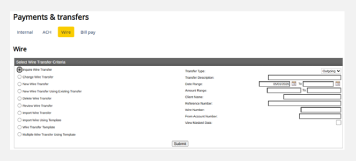
  2. Select the ‘Payments & Transfers’ tab and then ‘Wire’

Initiating Wires

  1. Fill in the required wire information (i.e., beneficiary, amount)
  2. Select ‘Process’
  3. Open the DigiPass Application on your mobile device
  4. Select ‘Digital Signature’ to scan the Cronto image on your computer with your mobile device
  5. On the wire submission page, enter the digital signature code shown on your mobile device
  6. A confirmation message will display, stating the wire is pending financial institution review

Dual Control Review

If you are not set up for Dual Control, skip this step.

  1. If you are set up for dual control review, the confirmation message will state that the wire is pending client and institution review
  2. All Wire users will receive an email notification that a Wire is pending review
  3. A second user will log in to business online or mobile banking and navigate to the Payment & Transfers section
  4. Under Review Wire, select the description link to review the transaction details
  5. Select the checkbox next to the wire transaction to either approve or disapprove, and click the applicable button
  6. A confirmation message will display, stating that the wire transfer has been approved/disapproved

Wire Verification & Processing

  1. Once the wire has been submitted and the dual control review has been completed (if applicable), the Bank will call an Authorized Person to confirm the wire
  2. Once the Authorized Person has verified the wire information, it will be submitted and processed by the Bank

Frequently Asked Questions

Our cut-off time for international wires is 3:00 PM CST, and for domestic wires, it is 4:00 PM CST.

No, the dual control requires a second person to review and approve the wire before the Bank processes it.

To reduce the risk of fraud and ensure the wire request is legitimate, the Bank has established a process requiring a callback to confirm the wire instruction details by an authorized person on the account.

Product Support

Have questions? Contact our product support team today—we’re here to help.

Send Email
(651) 461-8760

Business Online Banking

Access business online banking and learn about other online banking features.

LEARN MORE

Treasury Management

Check out additional services to help manage your business accounts and activity.

LEARN MORE

Additional Resources


Forms & Applications

Quick access to forms and applications to get you started.

LEARN MORE

Resource Center

Explore helpful tools, support, and financial resources.

LEARN MORE

Security Center

Tips and products on how to keep your accounts secure and protect them from fraud.

LEARN MORE

1 Mobile Banking can be used to approve wire transfers; other Wire Manager functionality requires Online Banking access through a web browser.

Build A Better Future.

We’re here to make your relationship with money simpler and more meaningful, helping you reach the future you’re aiming for.

ABOUT DRAKE BANK