IntraFi® Depositor Control Panel


Manage your ICS accounts securely online.

  • View all transactions, balance, and interest rate history
  • Review proposed placements of your funds
  • Keep track of monthly program withdrawals

How It Works


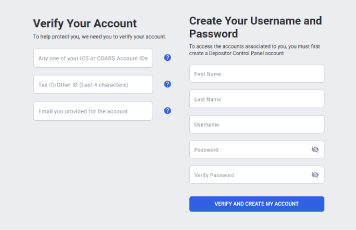
Two-column account setup: left side verifies your identity with ID fields, right side creates username and password with a blue Verify and Create My Account button.

Getting Started

Follow these steps to set up your online account.

  1. Go to depositorcontrol.com
  2. Click ‘Register’ to create a new account.
  3. Complete the form to verify the account. This will include any transaction account number associated with your IntraFi Network Deposits account(s), the last four digits of your tax ID, and your email address.
  4. Create a username and password, then click ‘Verify and Create My Account’.
Login form with fields for Username and Password, a 'Forgot username or password?' link, and a gray 'LOG IN' button on a pale gray background.

Verifying Your Account

  1. Verify your account by clicking the verification link in the email from no-reply@depositorcontrol.com. (Note: if you do not receive an email, check your spam folder)
  2. Once you click the verification link, it will take you back to the login screen to enter your username and password.
Login form with fields for Username and Password, a 'Forgot username or password?' link, and a gray 'LOG IN' button on a pale gray background.

Accessing IntraFi

  1. Go to depositorcontrol.com to log in
  2. Click ‘Additional Links’ in the top menu on our website

Frequently Asked Questions

The Depositor Control Panel (DCP) is a secure website specially created to help you manage your ICS IntraFi Network Deposits accounts.

Product Support

Have questions? Contact our product support team today—we’re here to help.

Send Email
(651) 461-8760

Business Online Banking

Access business online banking and learn about other online banking features.

LEARN MORE

Treasury Management

Check out additional services to help manage your business accounts and activity.

LEARN MORE

Additional Resources


Forms & Applications

Quick access to forms and applications to get you started.

LEARN MORE

Resource Center

Explore helpful tools, support, and financial resources.

LEARN MORE

Security Center

Tips and products on how to keep your accounts secure and protect them from fraud.

LEARN MORE

Build A Better Future.

We’re here to make your relationship with money simpler and more meaningful, helping you reach the future you’re aiming for.

ABOUT DRAKE BANK

Deposit placement through CDARS or ICS is subject to the terms, conditions, and disclosures in applicable agreements. Although deposits are placed in increments that do not exceed the FDIC standard maximum deposit insurance amount (“SMDIA”) at any one destination bank, a depositor’s balances at the institution that places deposits may exceed the SMDIA (e.g., before settlement for deposits or after settlement for withdrawals) or be uninsured (if the placing institution is not an insured bank). The depositor must make any necessary arrangements to protect such balances consistent with applicable law and must determine whether placement through CDARS or ICS satisfies any restrictions on its deposits. A list identifying IntraFi network banks appears at https://www.intrafi.com/network-banks. The depositor may exclude banks from eligibility to receive its funds. IntraFi and ICS are registered service marks, and the IntraFi hexagon and IntraFi logo are service marks of IntraFi Network LLC.